
IBM Granite Speech 4.1 running locally via MLX can transcribe both sides of a call in real time — microphone and system audio — without sending anything to the cloud. This post shows how to set it up on Apple Silicon.
Teams, Zoom, and Meet all have built-in transcription, but they send your audio to a cloud service. For calls involving customers, internal strategy, or anything sensitive, that is not always acceptable. The alternative is to run the speech model locally so nothing leaves the machine.
With IBM Granite Speech 4.1 and Apple’s MLX framework this is surprisingly practical — fast, private, and the output drops straight into your favorite text editor, in my case Obsidian.
Granite Speech 4.1
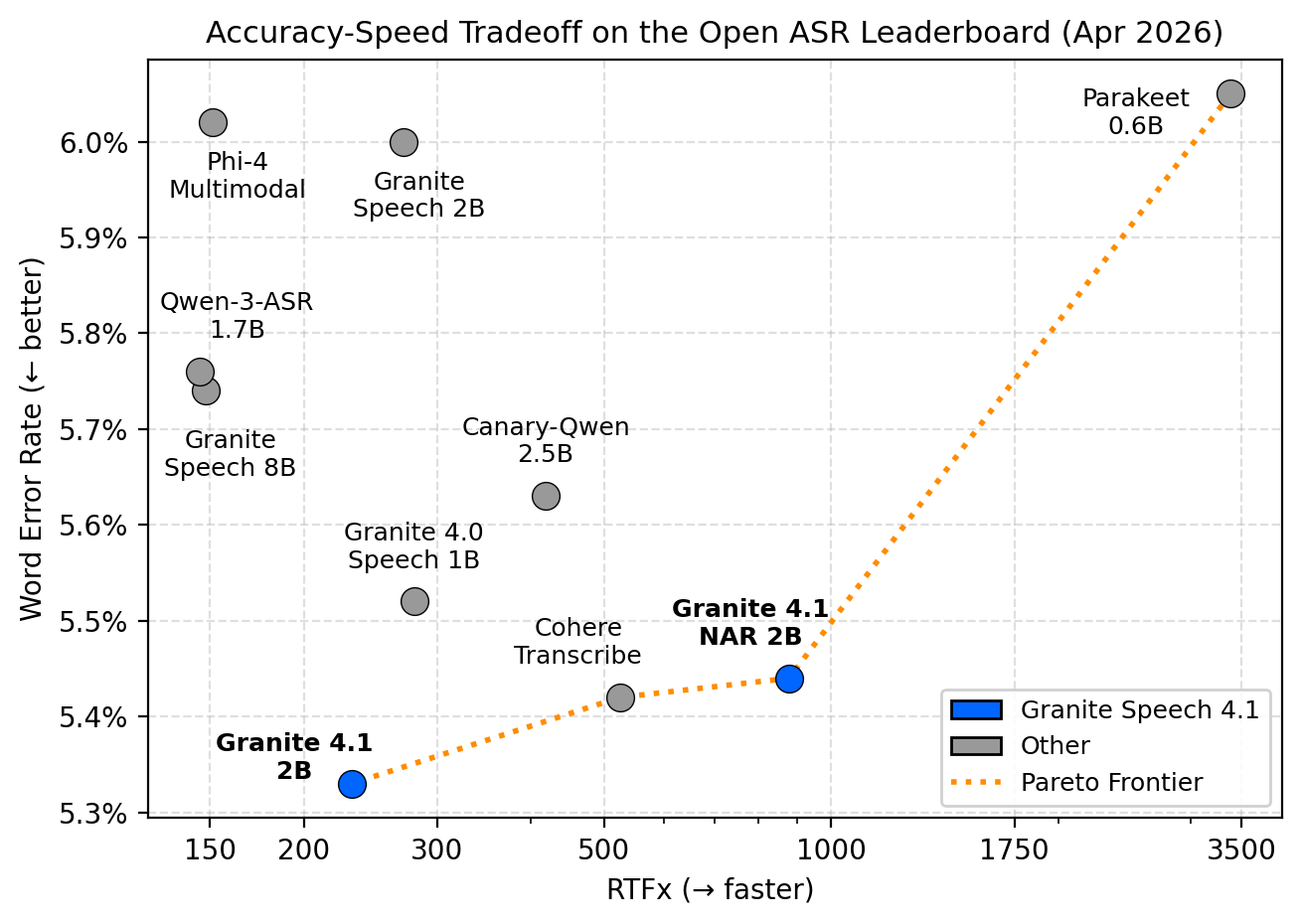
Granite Speech 4.1 2B is IBM’s compact speech-language model for multilingual ASR and speech translation across English, French, German, Spanish, Portuguese, and Japanese. It was trained on 174,000 hours of audio from public corpora and sits on the Pareto frontier of the Open ASR Leaderboard — meaning it achieves among the best word error rates for its inference speed class.
A few things make it stand out from the usual Whisper variants:
- Dual-head CTC encoder — graphemic and BPE outputs combined with frame importance sampling, which focuses computation on the informative parts of the audio and improves multilingual accuracy
- Punctuation and truecasing — including German noun capitalisation, enabled via a simple prompt change rather than post-processing
- Keyword biasing — better recognition of names, acronyms, and technical jargon out of the box
Two additional variants are worth knowing about: granite-speech-4.1-2b-plus adds speaker-attributed ASR and word-level timestamps, and granite-speech-4.1-2b-nar introduces a non-autoregressive architecture for higher throughput (visible on the chart above, trading a small accuracy loss for roughly 4× the speed).
For this project the standard 2B variant is the right choice — it sits cleanly on the Pareto frontier at an RTFx of around 200, uses 4.3 GB of memory, and handles the mixed German/English audio in my tests without any configuration.
The Stack
- IBM Granite Speech 4.1 2B — IBM’s open speech model on Hugging Face. Built on a Granite LM core, so it supports instruction-following over audio: transcribe, summarize, translate, or answer questions about a recording.
- MLX — Apple’s inference framework for Apple Silicon. Runs model weights directly in unified memory, which makes it significantly faster than PyTorch on the same hardware.
- mlx-audio — open-source library wrapping STT and TTS models for MLX, with a simple
load/generateAPI.
The 2B variant uses around 4.3 GB of memory and handles mixed-language audio (German and English in the same session, for example) without any configuration.
Audio Routing on macOS
Capturing the microphone is straightforward. Capturing system audio — what plays through your speakers — requires a loopback driver. BlackHole is the standard free solution for macOS.
1
brew install blackhole-2ch
Then in Audio MIDI Setup (find it with Spotlight):
(+)→ Create Multi-Output Device- Tick your normal output (AirPods, Built-in, etc.) and BlackHole 2ch
- System Settings → Sound → Output → select the new Multi-Output Device
Your audio still plays normally. BlackHole taps a silent copy and makes it available as an input device.
Running the Script
1
2
python transcribe.py --list-devices
python transcribe.py --mic "AirPods" --system "BlackHole"
Device names are matched by substring, so "AirPods" finds "AirPods Pro von Nikolas" automatically. Numeric indices work too.
1
2
3
4
5
--you      Speaker label for mic           (default: Microphone)
--them     Speaker label for system audio  (default: System Audio)
--title    Names the transcript and file
-o         Output path or directory
-t         VAD sensitivity threshold       (default: 0.01)
Two capture threads run concurrently, one per device. Each buffers audio when speech is detected and flushes the utterance after 800 ms of silence. Transcription runs sequentially on the main thread and writes each result to the output file immediately.
A live status bar shows recording time, queue depth, memory usage, and RTF while it runs:
1
● REC  00:03:42  ·  12 utterances  ·  queue: 0  ·  mem: 4.3 GB  ·  last RTF: 0.16×
Output
Every session produces a Markdown file with YAML front-matter — compatible with Obsidian, Logseq, and importable into Notion:
1
2
3
4
5
6
7
8
9
10
11
12
13
14
15
16
17
18
19
20
21
22
23
24
25
26
27
28
29
30
31
---
title: Call — 2026-05-08 14:14
date: 2026-05-08
time: 14:14
participants:
  - Microphone (AirPods Pro von Nikolas)
  - System Audio (BlackHole 2ch)
model: ibm-granite/granite-speech-4.1-2b
---

# Call — 2026-05-08 14:14

**[14:14:58] Microphone:** marcus smart hat ein schlechtes spiel.

**[14:15:02] Microphone:** und es fällt einfach bei den scoring options auf.

**[14:15:11] Microphone:** oh man

**[14:15:29] Microphone:** ich teste gerade unser gespräch live mit der transkription. ich gucke mal, wie das hier funktioniert.

**[14:15:44] Microphone:** das habe ich gesehen, das sehen wir auf die rast.

**[14:15:47] Microphone:** gegangen sind warum auch immer.

**[14:15:48] System Audio:** wir wollen die kryptowährung anders besteuern. das ist dann die verantwortung des finanzministeriums. auch dafür sorgen muss die staatlichen einnahmen gestärkt werden. so einfach kann der finanzminister in deutschland leider kein gesetz einführen, das die kryptos besteuert, weil er offensichtlich ein urteil vom bundesverfassungsgericht vom siebten juli zweitausendzehn übersehen hat, was genau auf den fall hier anwendung findet. deswegen sage ich jetzt drei steuerliche grundprinzipien zur besteuerung von kryptobesteuerung. und das dritte prinzip betrifft alle gesetzesänderungen zu ihrem vorteil. sie müssen also keine steuern zahlen.

**[14:15:50] Microphone:** free throw merchant


---
*Recording ended at 14:16:13 — 00:01:22, 11 utterances, 141 words*
1
2
3
4
5
6
7
8
9
10
11
12
13
14
15
16
17
18
19
20
21
22
23
24
25
26
---
title: Call — 2026-05-08 18:17
date: 2026-05-08
time: 18:17
participants:
  - System Audio (BlackHole 2ch)
model: ibm-granite/granite-speech-4.1-2b
---

# Call — 2026-05-08 18:17

**[18:17:55] System Audio:** so we

**[18:18:10] System Audio:** so what we're doing there, eric, is we're not trying to say how many mrs does someone send if they send something. we're saying how many mrs from external do we get for the size of our organization.

**[18:18:27] System Audio:** sorry i have a childhood emergency outside the door

**[18:18:45] System Audio:** so maybe explain the context behind this the context is as we grow as a company we should make sure we keep the community up like the logical thing is for the community to flatline and the size of the org to go and before you know it you've kind of outgrown the wider community

**[18:19:17] System Audio:** yeah, and what i'm seeing is we created this pretty sophisticated taxonomy with prefixes and postfixes to talk about these things, but in reality we've only got two of them, and we keep forgetting and we have a hard time discussing this thing, so i'd rather just name them simply, two names for what they are, rather than using that taxonomy. but also, like, in f, i have this proposal of like, what if we just tracked as a kpi the percentage of total mrs that come from the community over time, and we would see that drop.

**[18:19:34] System Audio:** i love that i love that let's do that instead okay but the thing the thing why we have this complex thing is because you can game that you want to game that you just produce fewer mrs with the engineers at gitlab


---
*Recording ended at 18:19:43 — 00:01:52, 7 utterances, 245 words*
The second example uses --system only, capturing a single audio source — a GitLab engineering meeting on YouTube. The script works equally well with just a mic, just system audio, or both simultaneously.
Because Obsidian live-reloads open files, you can leave the transcript open during the call and watch it update as the conversation progresses. Pointing -o to your vault folder is all the integration needed.
Performance
On Apple Silicon, Granite Speech 4.1 2B transcribes well under real-time. An RTF of 0.16 means each second of audio takes about 160 ms to process — fast enough that the queue never builds up during normal conversation.
1
2
13:50:35  System Audio  ↳  9.7s audio · 1.6s · RTF 0.16× · 4.3 GB
13:51:17  System Audio  ↳ 42.1s audio · 6.8s · RTF 0.16× · 4.3 GB
A few honest caveats: the VAD is energy-based, so a noisy environment will produce some false utterances. Speaker separation works by device, not by voice — multiple remote participants all appear under the same label. And this was tested with microphone input and browser audio from a YouTube video, not a full multi-party call, so real-world results may vary. I’m very interested to hear from your experiences using Granite Speech 4.1! See below for my python script and further references.
The Script
One thing worth calling out: the script includes a monkey-patch for a bug in the current mlx-audio release. The Granite Speech model’s weight loader doesn’t correctly transpose the convolutional layer tensors when converting from PyTorch layout, which causes silent shape mismatches at inference time. The fix patches the sanitize method at import. I’ve submitted a pull request to the mlx-audio repo — once merged the workaround can be removed.